Unlock your full potential

HeartOxy transforms your Apple Watch into a smarter workout partner so you can train with confidence every step of the way.

Download on the App Store
  • Apple Watch Series 4 or later
  • iPhone 8 or later
  • iOS 16 or later
  • watchOS 9 or later

Your Apple Watch measures.
HeartOxy guides.

Your Apple Watch measures your heart rate. HeartOxy turns those readings into simple guidance that helps you train with more confidence without constantly checking your wrist.

Know your effort

Know when to push harder, ease off or stay in your target zone.

No guessing. No constant checking.

See your progress

Review every session and understand how your training is improving over time.

Enjoy the journey

Spend less time wondering and more time enjoying every walk, run or workout.

How It Works

Simple. Every time.

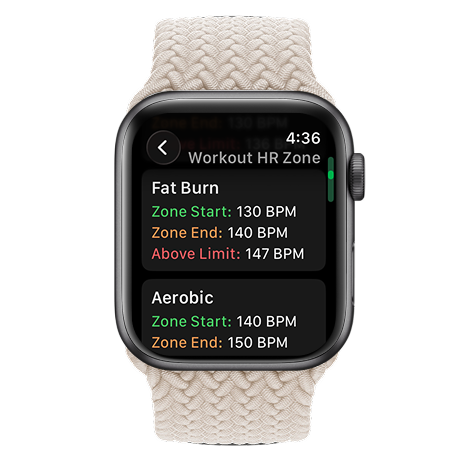
Apple Watch showing heart-rate zone selection

Choose your zone.

Choose your target zone. HeartOxy guides you from there.

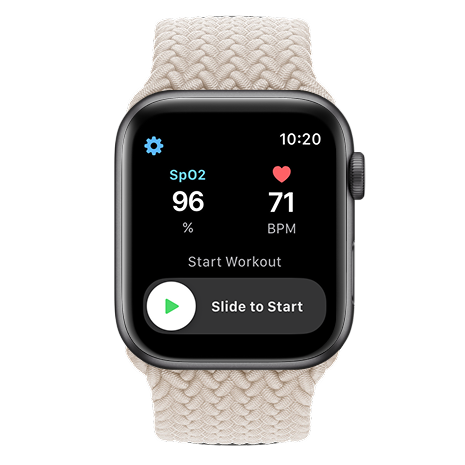
Apple Watch showing slide to start a workout

Start your workout.

HeartOxy is with you from your first beat.

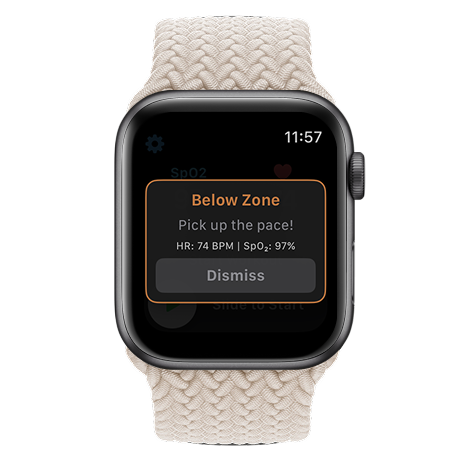
Apple Watch showing a below-zone alert during a workout

Train with confidence.

Feel a tap the moment you drift. Stay in the workout, not in your head.

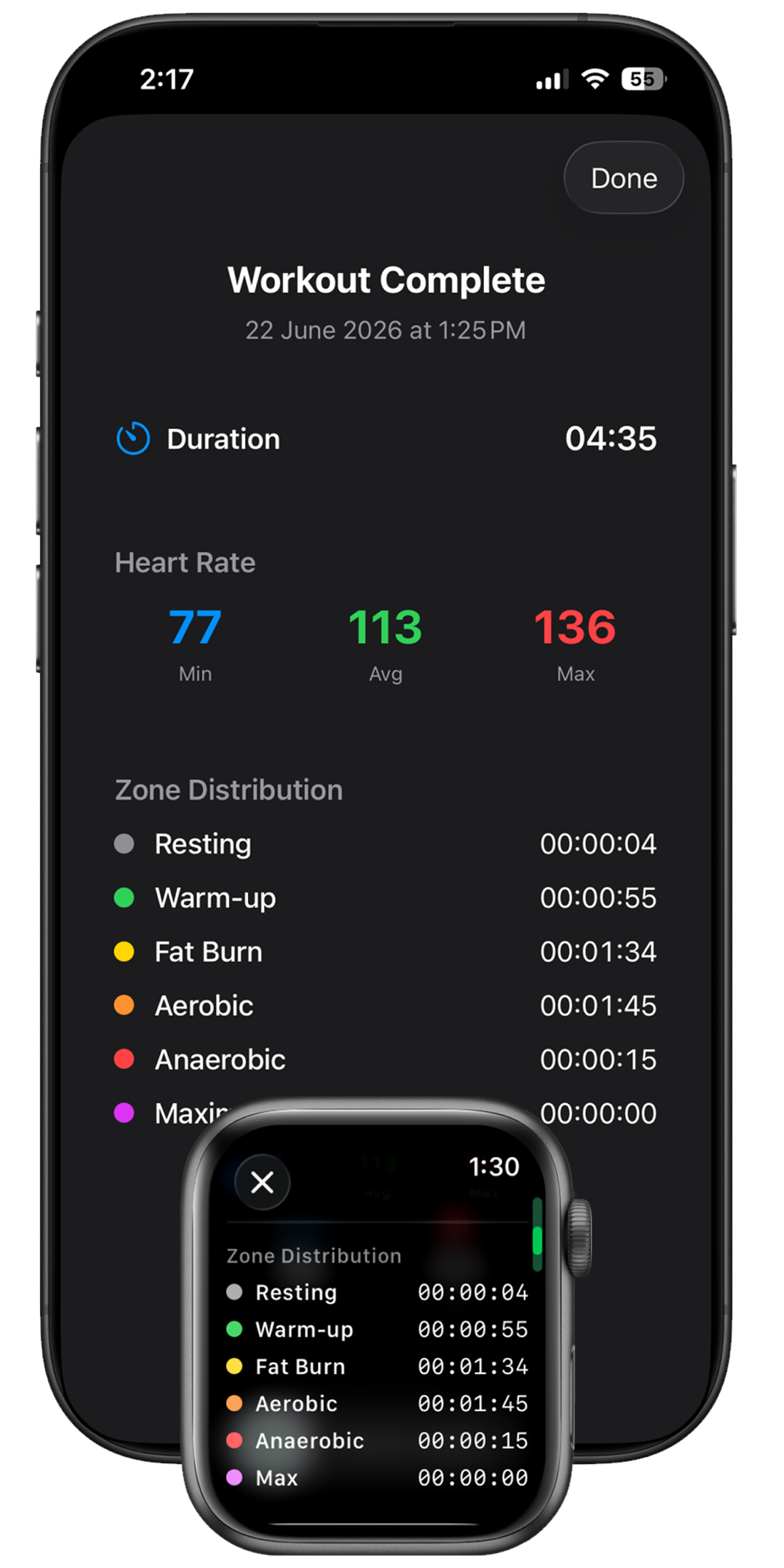
iPhone showing workout summary with zone distribution

Review your progress.

Every workout is saved so you can track how your training improves over time.

The Difference

How every workout feels with HeartOxy.

Before

"I'm working hard... but I don't know if I'm working smart."

During

Guided by live heart-rate feedback and instant zone alerts. Every workout. Every step.

After

"I know every workout is moving me forward."

Testimonials

"I used to keep lifting my wrist to check my heart rate. Now the tap tells me everything I need to know."

Sarah • Runner

"Seeing my heart rate on the live chart during intervals made it much easier to know when I was ready for the next effort."

James • Cyclist

"Some mornings I'm ready to go. Other days I'm not. Daily Readiness helps me train according to how my body actually feels."

Linda • Walker

"I never knew if I was working hard enough or too hard. Now I finish every session feeling like I trained at the right intensity."

Chris • Gym-goer

"Exercise used to feel like guesswork. Now I know when to ease off and when to push harder."

Emma • Hiker

FAQ

Frequently Asked Questions

What can HeartOxy do for me?

HeartOxy helps you train smarter with your Apple Watch. It shows your heart rate on a live chart, alerts you when you move outside your target zone, and helps you stay at the right workout intensity without constantly checking your wrist.

Beyond your workout, HeartOxy also automatically calculates personalised heart-rate zones, provides Daily Readiness insights, saves every workout so you can review your progress over time, and lets you export your workout history as a CSV file.

Do I need anything other than my Apple Watch?

No. HeartOxy works with your Apple Watch and iPhone. There's no additional wearable to buy, wear or charge.

Is it complicated to set up?

Not at all. Choose your heart-rate zone, start a workout on Apple Watch, and HeartOxy guides you from there. Most people are training in under a minute.

Can I see my heart rate while I'm training?

Yes. HeartOxy displays your heart rate on a live chart throughout your workout so you can see exactly how your heart rate responds in real time.

Can HeartOxy alert me during my workout?

Yes. HeartOxy provides real-time haptic alerts whenever your heart rate moves outside your selected training zone, helping you stay focused on your workout instead of constantly checking your wrist.

Why not just watch my heart rate manually?

By the time you notice you're outside your zone and look down at your Apple Watch, the moment has passed. HeartOxy alerts you immediately, so you can adjust without interrupting your session or losing focus.

Can I customise the heart-rate update interval?

Yes. Choose how often HeartOxy updates your heart rate during workouts — from every second for the fastest feedback to longer intervals that help extend battery life during longer sessions.

How accurate is Apple Watch for heart rate zone training during exercise?

Apple Watch uses optical photoplethysmography (PPG) sensors to measure heart rate. Scientific studies comparing Apple Watch readings with ECG reference measurements have reported correlations of approximately 0.96 in general use and approaching 0.99 during exercise making it well-suited for zone training.

What are heart rate zones on Apple Watch?

Heart rate zones are ranges that represent different levels of workout intensity. Staying within a zone helps you control how hard you're training — from light effort to high intensity.

HeartOxy lets you set your own zones and gives you real-time feedback and alerts during workouts so you always know when to push and when to ease off.

Why should I use heart rate zone training for my workouts?

Heart rate zone training ensures workouts are performed at the correct intensity for your specific goals whether that's endurance building, fat burning or peak performance improvement.

How does HeartOxy calculate my heart-rate zones?

HeartOxy automatically calculates personalised heart-rate zones using your age, resting heart rate (RHR) and heart rate variability (HRV), giving you training zones that better reflect your current fitness. It uses established training formulas rather than a one-size-fits-all estimate.

How do I monitor my heart rate zones during workouts on Apple Watch?

HeartOxy displays your current heart rate on a live chart, shows your active training zone in real time, and alerts you immediately when you move outside your selected range. You can stay focused on your workout instead of constantly checking your wrist.

How can I avoid pushing too hard when training with heart rate zones?

Heart rate zones let you set an upper limit for your effort. HeartOxy alerts you on your wrist the instant your heart rate crosses above your selected zone so you can ease off before you overdo it.

Can I track my heart rate outside of workouts with Apple Watch and HeartOxy?

Your Apple Watch records heart rate throughout the day. HeartOxy is designed for workouts where it provides real-time zone feedback and alerts.

Outside of workouts, it uses your recent data to give you a daily readiness view — helping you decide how hard to train.

What is Daily Readiness?

Daily Readiness combines your resting heart rate (RHR), heart rate variability (HRV) and recent activity to estimate how ready your body is for today's workout, helping you decide whether to push harder or recover.

How does HeartOxy decide which heart rate zone I should train in?

Based on your Daily Readiness status, HeartOxy suggests training one or two heart-rate-zone tiers down on days your body needs it — for example, suggesting Aerobic instead of Anaerobic on a strained day.

It never suggests training in a higher zone than usual and it never suggests a tier-down if you're already in your lowest zone.

Does HeartOxy save my workouts?

Yes. Every workout is automatically saved so you can review your workouts, compare sessions and track your progress over time.

Can I export my workout data?

Yes. HeartOxy lets you export your workout history as a CSV file to analyse in spreadsheet software or share with your coach or training partners.

Do I need a subscription?

No. HeartOxy is available as a one-time purchase. Once unlocked, all premium features are yours without an ongoing monthly subscription.

If my SpO₂ reading is outside the low zone, how do I reset the feedback?

SpO₂ measurements are taken automatically by Apple Watch and updated to HeartOxy.

To refresh or update the reading in HeartOxy, you can manually trigger a new measurement using the Blood Oxygen app on Apple Watch:

  1. Open the Blood Oxygen app on Apple Watch
  2. Start a new SpO₂ measurement
  3. The updated reading will sync to HeartOxy

Alternatively, you can disable the feedback notification: Settings → Zone Feedback → Advanced → Below Zone Limit, then turn off the Below Zone Limit feedback option.

** Apple Watch (Series 6 and later, Ultra) takes random measurements of blood oxygen (SpO₂) levels automatically during sleep. However, you can obtain a measurement by using the Blood Oxygen app. It takes 15 seconds of steady, flat-wristed holding to get a reading.

Important Limitations: SpO₂ features are currently disabled on new Apple Watches sold in the USA due to a patent lawsuit, though they remain active on devices sold elsewhere and older US models.

How can I reduce repeated heart rate or SpO₂ alerts during workouts?

If your heart rate or SpO₂ readings remain outside zones such as Below Zone Limit (HR), Above Zone Limit (HR), or Below SpO₂ Low, HeartOxy may trigger repeated intensity alerts every 10 seconds.

To reduce repeated notifications:

  1. Open Settings
  2. Go to Zone Feedback
  3. Select Advanced
  4. Turn off Repeat Zone Alerts

This will prevent repeated alerts every 10 seconds while readings remain outside the configured zones. Alerts will default to every 60 seconds instead.

Is HeartOxy a medical device?

No. HeartOxy is designed for wellness and fitness purposes only. It is not a medical device, not FDA-approved and not a substitute for professional medical advice. Consult a healthcare provider before starting any new exercise programme.

Ready to unlock your
full potential?

Download HeartOxy today and start training with more confidence from your very first workout.

Download on the App Store